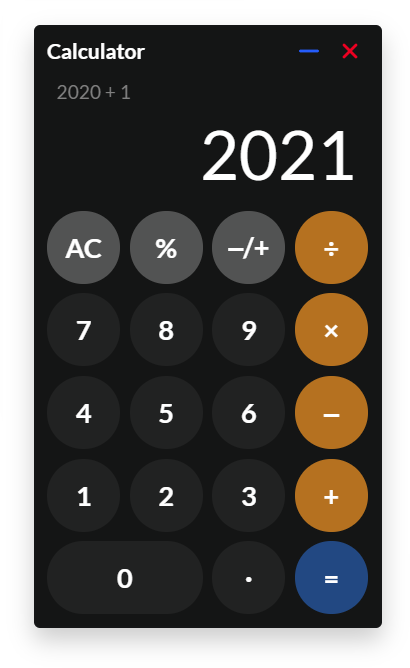
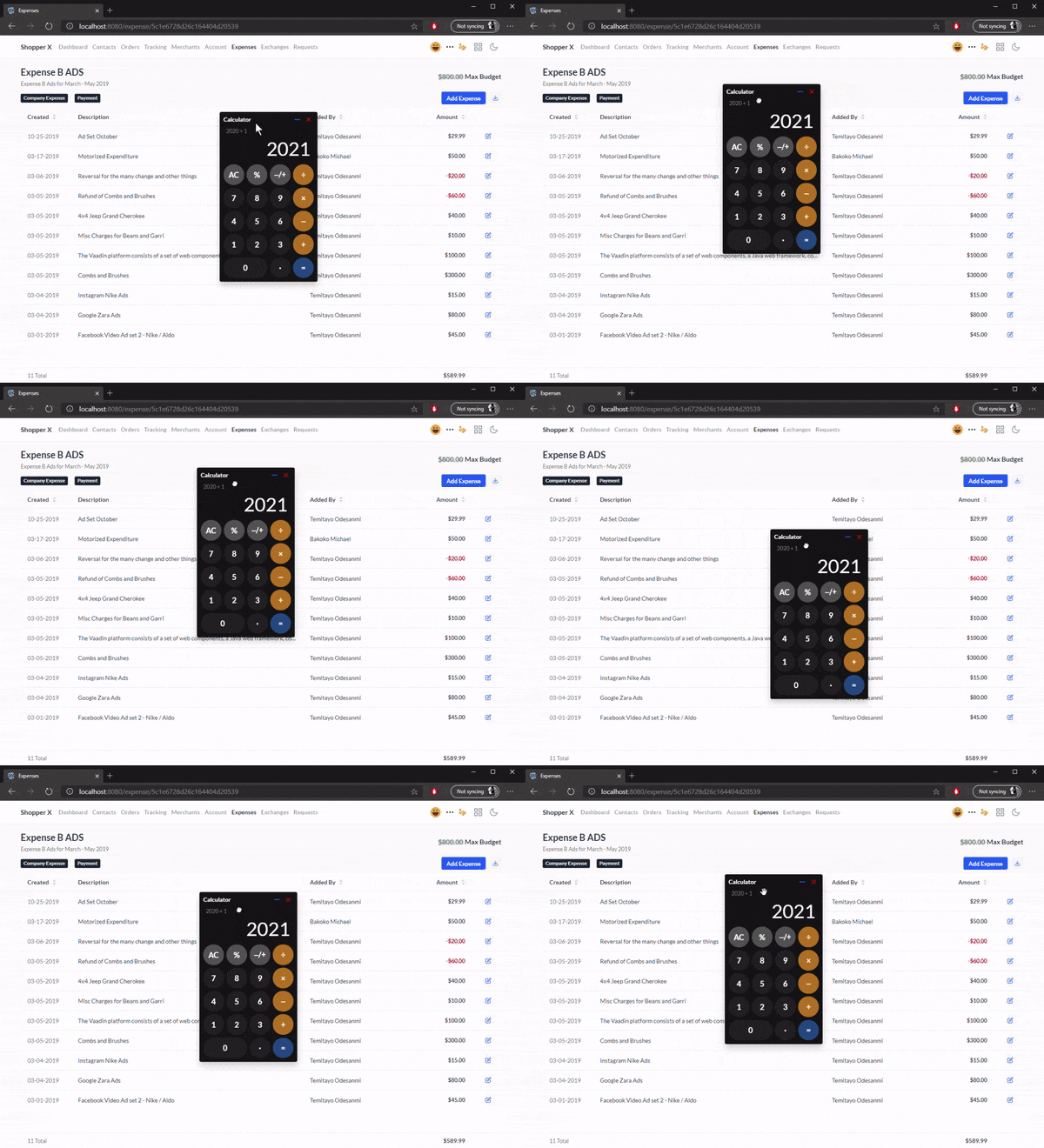
We are going to use the following imports for this Web Component:
import { PolymerElement } from '@polymer/polymer/polymer-element.js';
import { html } from '@polymer/polymer/lib/utils/html-tag.js';
import { GestureEventListeners } from '@polymer/polymer/lib/mixins/gesture-event-listeners.js';
Also, all CSS variables such as font-size: var(–lumo-font-size-s);
are defined at https://cdn.vaadin.com/vaadin-lumo-styles/1.5.0/demo/colors.html
Next, we define our CalculatorWidget class extending GestureEventListeners, which Polymer Library provides to support gestures (touch and mouse events).
class CalculatorWidget extends GestureEventListeners(PolymerElement) {
        static get is() {
            return 'calculator-widget'
        }
        static get properties() {
            return { }
        }
        ready() {
            super.ready();
        }
        static get template() {
            return html``
        }
}
customElements.define(CalculatorWidget.is, CalculatorWidget);
Properties
static get properties() {
    return {
        showwidget:{type:Boolean, value:false, reflectToAttribute: true, observer: 'showwidgetObserver' },
        collapse:{type:Boolean, value:false, reflectToAttribute: true, observer: 'collapseObserver' },
        displayvalue:{type:String},
        header_text:{type:String},
        page: {type:Number, value: 0}
    }
}
Gestures
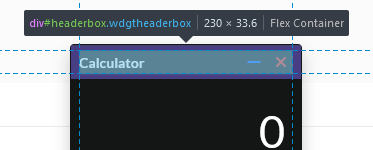
This is done using the on-track annotation listener on the header section of the widget. This is where we want the user to be able to grab the widget.

handleTrack(e) {
            switch(e.detail.state) {
              case 'start':
                {
                    this.dragrect = this.$.draggable.getBoundingClientRect();
                    this.rectwidth = this.dragrect.width;
                    this.rectheight = this.dragrect.height;
                    this.windowwidth = window.innerWidth;
                    this.windowheight = window.innerHeight;
                }
                break;
              case 'track':
                  {
                    let targettop = (this.dragrect.top + e.detail.dy);
                    let targetleft = (this.dragrect.left + e.detail.dx);

                    if (targettop < 0)
                        targettop = 0;

                    if (targettop + this.rectheight > this.windowheight)
                        targettop = this.windowheight - this.rectheight;

                    if (targetleft < 0)
                        targetleft = 0;

                    if (targetleft + this.rectwidth > this.windowwidth)
                        targetleft = this.windowwidth - this.rectwidth;

                    this.$.draggable.style.top = targettop + 'px';
                    this.$.draggable.style.left = targetleft +'px';
                  }
                break;
              case 'end':
                  {
                    this.dragrect = this.$.draggable.getBoundingClientRect();
                  }
                break;
            }
        }
In the method above, we are basically getting the position of the draggable rect when the mouse event starts and adjusting the position of the element as the move event changes. The switch cases (start, track and end) help distinguish between the different ‘states’. Also, we are ensuring that the widget does not leave the screen bounds.
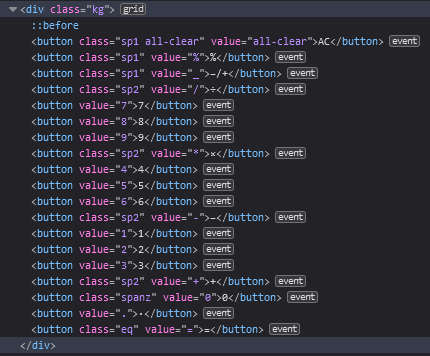
CSS Grid
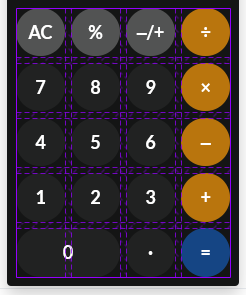
We can define our grid of buttons using the grid templates
.kg {
    display: grid;
    grid-gap: 0.4em;
    margin: 0.5rem;
    grid-template-columns: 1fr 1fr 1fr 1fr;
    grid-template-rows: 1fr 1fr 1fr 1fr 1fr;
}
The final CalculatorWidget class
import { PolymerElement } from '@polymer/polymer/polymer-element.js';
import { html } from '@polymer/polymer/lib/utils/html-tag.js';
import { GestureEventListeners } from '@polymer/polymer/lib/mixins/gesture-event-listeners.js';
class CalculatorWidget extends GestureEventListeners(PolymerElement) {
static get is() { return 'calculator-widget'}
static get properties() {
return {
showwidget:{type:Boolean, value:false, reflectToAttribute: true, observer: 'showwidgetObserver' },
collapse:{type:Boolean, value:false, reflectToAttribute: true, observer: 'collapseObserver' },
displayvalue:{type:String},
header_text:{type:String},
page: {type:Number, value: 0}
}
}
ready() {
super.ready();
this.displayvalue = '0';
this.history = '';
this.calculator = {
firstOperand: undefined,
waitingForSecondOperand: false,
operator: null,
};
}
inputDigit(e) {
let digit = e.target.value;
let { waitingForSecondOperand } = this.calculator;
if (waitingForSecondOperand === true) {
this.displayvalue = digit;
this.calculator.waitingForSecondOperand = false;
} else {
this.displayvalue = this.displayvalue === '0' ? digit : this.displayvalue + digit;
}
}
inputDecimal(e) {
let dot = e.target.value;
if (this.calculator.waitingForSecondOperand === true) return;
// If the `displayvalue` does not contain a decimal point
if (!this.displayvalue.includes(dot)) {
// Append the decimal point
this.displayvalue += dot;
}
}
handleOperator(e) {
let nextOperator = e.target.value;
let { firstOperand, operator } = this.calculator
let inputValue = parseFloat(this.displayvalue);
if (operator && this.calculator.waitingForSecondOperand) {
this.calculator.operator = nextOperator;
return;
}
if (firstOperand == null) {
this.calculator.firstOperand = inputValue;
} else if (operator) {
let currentValue = firstOperand || 0;
let result = this.performCalculation(operator, currentValue, inputValue);
if(operator === '=') {
this.history = '';
} else {
this.history = currentValue + ' ' + operator + ' ' + inputValue;
}
this.displayvalue = String(result);
this.calculator.firstOperand = result;
}
this.calculator.waitingForSecondOperand = true;
this.calculator.operator = nextOperator;
}
resetCalculator() {
this.history = '';
this.displayvalue = '0';
this.calculator.firstOperand = null;
this.calculator.waitingForSecondOperand = false;
this.calculator.operator = null;
}
performCalculation(operator, a, b) {
if('/'=== operator) return a / b;
if('*'=== operator) return a * b;
if('+'=== operator) return a + b;
if('-'=== operator) return a - b;
if('%'=== operator) return a / 100.00;
if('_'=== operator) return (-1) * a;
if('='=== operator) return b;
};
showwidgetObserver(newVar, oldVar) {
if (newVar)
this.openWidget();
else
this.closeWidget();
}
collapseObserver (newVar, oldVar) {
if(newVar)
this.$.calculatorkeys.classList.add("displaynone");
else
this.$.calculatorkeys.classList.remove("displaynone");
}
iconForCollapse(r) { return (r === true) ? 'lumo:plus' : 'lumo:minus'; }
closeWidget() {
this.$.draggable.classList.remove("animated", "fadeIn", "faster");
this.$.draggable.classList.add("displaynone");
}
openWidget() {
this.$.draggable.classList.add("animated", "fadeIn", "faster");
this.$.draggable.classList.remove("displaynone");
}
toggleWidgetOpen() {
this.showwidget = !this.showwidget;
}
toggleWidgetCollapse() {
this.collapse = !this.collapse;
}
clearAll() {
console.log('clearAll');
this.resetCalculator();
}
handleTrack(e) {
switch(e.detail.state) {
case 'start':
{
this.dragrect = this.$.draggable.getBoundingClientRect();
this.rectwidth = this.dragrect.width;
this.rectheight = this.dragrect.height;
this.windowwidth = window.innerWidth;
this.windowheight = window.innerHeight;
}
break;
case 'track':
{
let targettop = (this.dragrect.top + e.detail.dy);
let targetleft = (this.dragrect.left + e.detail.dx);
if (targettop < 0)
targettop = 0;
if (targettop + this.rectheight > this.windowheight)
targettop = this.windowheight - this.rectheight;
if (targetleft < 0)
targetleft = 0;
if (targetleft + this.rectwidth > this.windowwidth)
targetleft = this.windowwidth - this.rectwidth;
this.$.draggable.style.top = targettop + 'px';
this.$.draggable.style.left = targetleft +'px';
}
break;
case 'end':
{
this.dragrect = this.$.draggable.getBoundingClientRect();
}
break;
}
}
static get template() {
return html`<style>
.calculator-window-content {
right:0;
border-radius: var(--lumo-border-radius);
display:block;
position:fixed;
background-color: hsl(180, 2.4%, 8%);
width:230px;
box-shadow: 0px 8px 16px 0px rgba(0,0,0,0.2);
z-index:4000;
overflow:hidden;
border: 1px solid var(--lumo-contrast-5pct);
}
.wdgtheaderbox {
color: white;
line-height: 1em;
padding: 0.3rem 0.5rem;
cursor: grab;
flex-shrink: 0;
display:flex;
justify-content:space-between;
align-items:center;
height: 1.5rem;
}
.wdgtheaderbox:active { cursor: grabbing; }
.wdgtfooterbox {
line-height: 1em;
border-top: 1px solid var(--lumo-shade-10pct);
padding: 10px 2px;
flex-shrink: 0;
}
#dropdown { }
#widgetholder { }
.iconsminus { color:orange; width:1.5em; height:1.5em; }
.iconcross { color:orange; width:1.5em; height:1.5em; }
.displaynone { display:none; }
.header_text { font-weight:600; font-size: var(--lumo-font-size-s); }
.screen > .active {
font-size: 2.8rem;
height: 4rem;
color: white;
text-align: right;
overflow: hidden;
text-overflow: ellipsis;
}
.screen > .history {
font-size: 0.8rem;
height: 1rem;
color: grey;
}
.screen {
padding: 0em 0.5em 0.1em 0.4em;
margin: 0 0.5rem;
font-family: var(--lumo-font-family);
}
button {
border: 0px;
cursor: pointer;
font-weight: 600;
background: #46464642;
font-size: var(--lumo-font-size-l);
font-family: var(--lumo-font-family);
color: white;
border-radius: 3rem;
transition: ease-in-out 0.15s;
}
button:hover { background: #80808042; }
button:active { background: var(--lumo-contrast-20pct); }
button:hover, button:focus { text-decoration: none; }
.sp1 { background-color: #a5a5a56e; }
.sp2 { background-color: #ff9e0ab3; }
.sp2:hover { background-color: #ffa700; }
.all-clear:hover { background-color: var(--lumo-error-color-50pct); }
.eq { background-color:var(--lumo-primary-color-50pct); }
.eq:hover { background-color:var(--lumo-primary-color); }
.kg {
display:grid;
grid-gap:0.4em;
margin:0.5rem;
grid-template-columns: 1fr 1fr 1fr 1fr;
grid-template-rows: 1fr 1fr 1fr 1fr 1fr;
}
.kg::before {
content: '';
width: 0;
padding-bottom: 100%;
grid-row: 1 / 1;
grid-column: 1 / 1;
}
.kg > *:first-child {
grid-row: 1 / 1;
grid-column: 1 / 1;
}
page {
display: flex;
flex-direction: column;
align-items: center;
}
.spanz { grid-column: 1 / 3; }
</style>
<vaadin-button title='Calculator' on-click="toggleWidgetOpen" id='openbtn' theme='small tertiary icon'><feather-icon icon="grid" size='22px' color="var(--lumo-contrast-50pct)"></feather-icon></vaadin-button>
<div class='calculator-window-content displaynone' id='draggable'>
<div id='headerbox' class='wdgtheaderbox' on-track="handleTrack">
<span class='header_text'>Calculator</span>
<div>
<vaadin-button on-click="toggleWidgetCollapse" theme='small tertiary-inline'><iron-icon icon="[[iconForCollapse(collapse)]]"></iron-icon></vaadin-button>
<vaadin-button on-click="toggleWidgetOpen" theme='small tertiary-inline error'><iron-icon icon="lumo:cross"></iron-icon></vaadin-button>
</div>
</div>
<div id='widgetholder'>
<vaadin-tabs selected="{{page}}" theme="centered small" disable hidden>
<vaadin-tab>Calculator</vaadin-tab>
<vaadin-tab>Converter</vaadin-tab>
</vaadin-tabs>
<iron-pages selected="[[page]]">
<page>
</page>
<page></page>
</iron-pages>
<div>
<div class="screen">
<div class="history">[[history]]</div>
<div class="active" title=[[displayvalue]]>[[displayvalue]]</div>
</div>
<div id='calculatorkeys'>
<div class="kg">
<button class="sp1 all-clear" value="all-clear" on-click="clearAll">AC</button>
<button class="sp1" value="%" on-click="handleOperator">%</button>
<button class="sp1" value="_" on-click="handleOperator">‒/+</button>
<button class="sp2" value="/" on-click="handleOperator">÷</button>
<button value="7" on-click="inputDigit">7</button>
<button value="8" on-click="inputDigit">8</button>
<button value="9" on-click="inputDigit">9</button>
<button class="sp2" value="*" on-click="handleOperator">×</button>
<button value="4" on-click="inputDigit">4</button>
<button value="5" on-click="inputDigit">5</button>
<button value="6" on-click="inputDigit">6</button>
<button class="sp2" value="-" on-click="handleOperator">‒</button>
<button value="1" on-click="inputDigit">1</button>
<button value="2" on-click="inputDigit">2</button>
<button value="3" on-click="inputDigit">3</button>
<button class="sp2" value="+" on-click="handleOperator">+</button>
<button class="spanz" value="0" on-click="inputDigit">0</button>
<button value="." on-click="inputDecimal">·</button>
<button class="eq" value="=" on-click="handleOperator">=</button>
</div>
</div>
</div>
</div>
</div>`
}
}
customElements.define(CalculatorWidget.is, CalculatorWidget);